Pages

Showing posts with label Browser. Show all posts

Stretch your table to full page

In a previous blog I mentioned dynamic stretching table height with the autoHeightRows property. However, I have noticed people are having more troubles with stretching the height of the table.

This time I will focus on stretching your table to fill the total page height. We start with a simple ADF table on the employee table, showing all employees. Although I have seen more complex questions, including regions and more components in the structure, it all comes down to the same principle. I created a pretty straight forward jsf file with the following structure:


On the panelCollection I have set the styleClass AFStretchWidth to stretch the table to the full width of the page, however, by default it will not stretch the full height, but it will look like this:
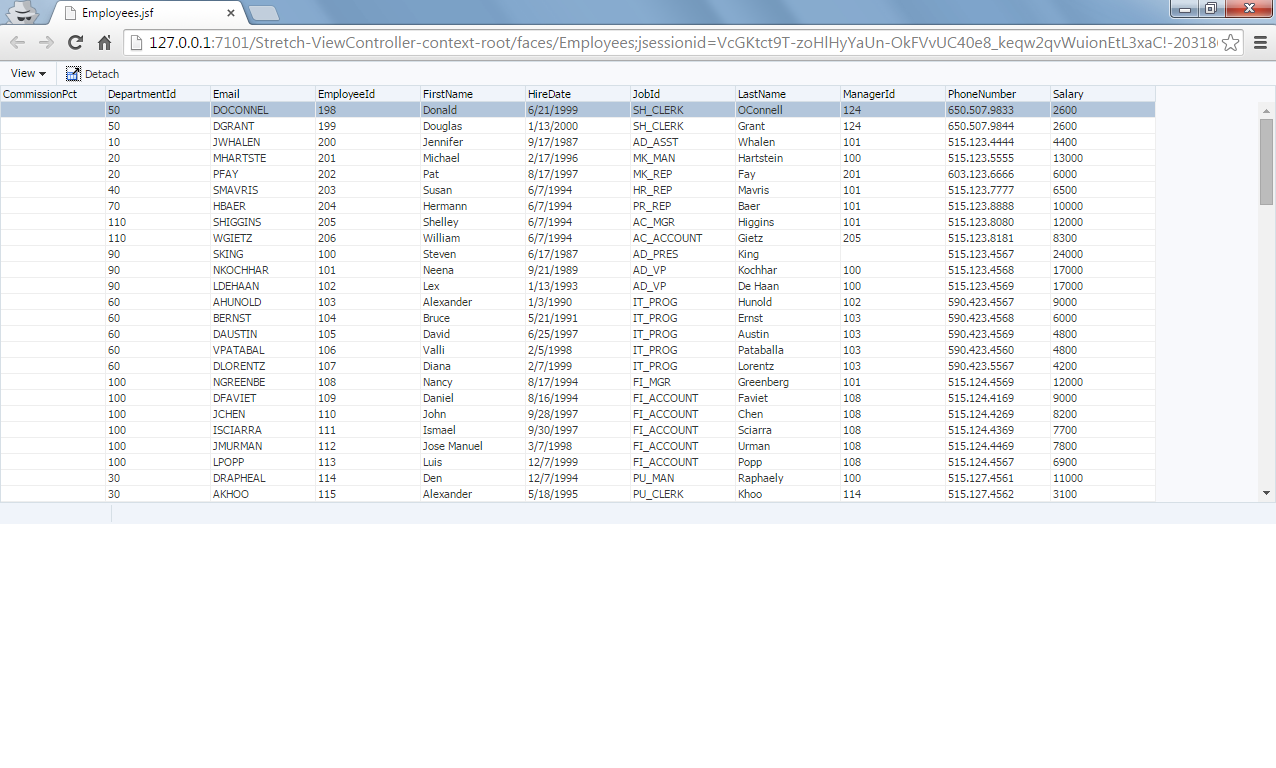
Especially when you have a more complex structure, with more layout components in your page, it is easy to think you configured something wrong, however, this is the default behavior even when you use the panelStretchLayout.
In the documentation of the panelStretchLayout you can read up on the Geometry Management, it is important to focus on the section about the ‘dimensionsFrom’ property. The default value is read from the web.xml context-param ‘oracle.adf.view.rich.geometry.DEFAULT_DIMENSIONS’ which results in ‘auto’.
However, for our page we want the table to take the dimensions from parent. You can set the dimensionsFrom="parent" on the panelStretchLayout on your page, or you can override the default in the web.xml parameter.
The result will be the same, a table shown over the full page:


Start an incognito browser from JDeveloper

In web development, a lot of times you want to avoid your browser caching messing up different sessions. Luckily most browser have some sort of an incognito modus now a days. I myself use Google Chrome the most while developing in ADF.

There is a command line start up parameter to start Google Chrome in incognito modus, a great feature in JDeveloper is that you can set these command line parameters.
If you navigate to your preferences and go to the tab Web Browser and Proxy:

Here you see I've added the command '--incognito' as Application Command Line Parameter. That's all it takes, if you now run your web application, it should start an incognito window.

Notice the symbol of the incognito browser in the left top of your browser window: