A new release of the ADF EMG Audit Rules has been out, version: 12.2.1.1.20170129.1659
You can find the artefacts on the download page here.
Or just use the Help -> Check for Updates function and find it in the Open Source section.
Resources:
Showing posts with label Audit Rules. Show all posts
Showing posts with label Audit Rules. Show all posts

New Release: SonarQube ojaudit plugin
There is a new release of the ojaudit plugin for SonarQube on github.
Version 2.0 of this plugin is now compatible with SonarQube 5.6 and 6.0.
For the release, please go to: https://github.com/adfemg/sonarqube-ojaudit/releases/tag/2.0
The sources can be found on github under adfemg: https://github.com/adfemg/sonarqube-ojaudit
Version 2.0 of this plugin is now compatible with SonarQube 5.6 and 6.0.
For the release, please go to: https://github.com/adfemg/sonarqube-ojaudit/releases/tag/2.0
The sources can be found on github under adfemg: https://github.com/adfemg/sonarqube-ojaudit
ADF EMG Audit Rules 12.2.1 Released
The ADF EMG Audit Rules are now available on JDeveloper 12.2.1. I want to thanks to Alexis López for reminding me and helping me out!
If you go to Check for Updates, make sure you tick the 'Open Source and Partners Extensions' and click next:

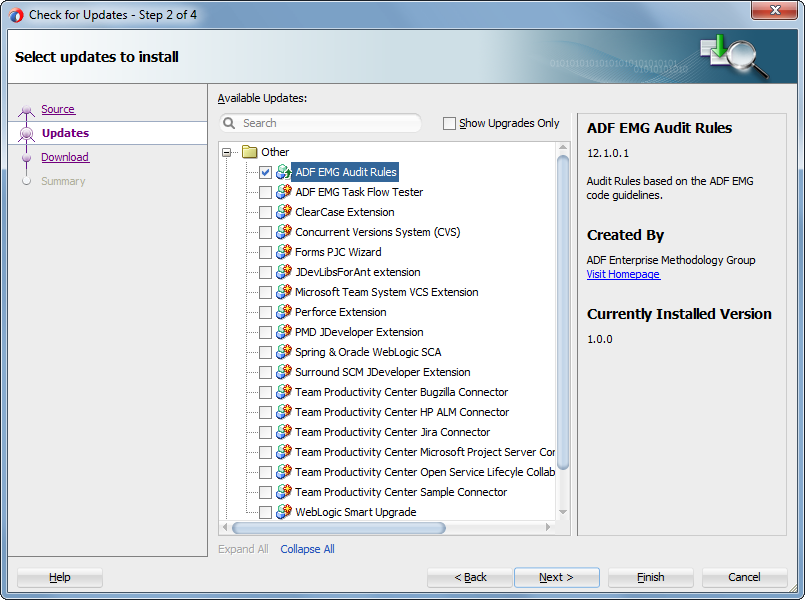
You should see the 'ADF EMG Audit Rules' appear, tick them and click next:

Wait for the download and install, you should see the ADF EMG Audit Rules being installed:

Restart JDeveloper and you are good to go, happy coding!
If you go to Check for Updates, make sure you tick the 'Open Source and Partners Extensions' and click next:

You should see the 'ADF EMG Audit Rules' appear, tick them and click next:

Wait for the download and install, you should see the ADF EMG Audit Rules being installed:

Restart JDeveloper and you are good to go, happy coding!
ADF EMG Audit Rules moved to Atlassian
For those contributing and using the ADF EMG Audit Rules extension, this is now moved to the Atlassian Suite. Here we have better integration and more modern tools than on java.net.
Big thanks to Wilfred for helping me out with the conversion.
Make sure to save/bookmark the following links:
- Bitbucket
- Confluence / wiki
- Jira
- Bamboo
The old svn repository on java.net is deleted and you can now use git to connect to the repository on bitbucket. If you’re new to git I advise SourceTree from Atlassian as tool.
Big thanks to Wilfred for helping me out with the conversion.
Make sure to save/bookmark the following links:
- Bitbucket
- Confluence / wiki
- Jira
- Bamboo
The old svn repository on java.net is deleted and you can now use git to connect to the repository on bitbucket. If you’re new to git I advise SourceTree from Atlassian as tool.
ADF EMG Audit Rules available on JDeveloper 12.1.3
I got a few questions from people why the ADF EMG Audit Rules are not available in JDeveloper 12.1.3. So there has been a new release of the ADF EMG Audit Rules. No new functionality is implemented this time, but the extension is now available for JDeveloper 12.1.3.
If you go to Help -> Check for Updates, tick the Open source and Partner Extensions checkbox and press Next:
If you go to Help -> Check for Updates, tick the Open source and Partner Extensions checkbox and press Next:

Select the ADF EMG Audit Rules and click Next:

The extension ADF EMG Audit Rules should be installed correctly, click finish and restart JDeveloper 12.1.3:

Now if you go to your Tools -> Preferences, there is a button ‘Manage Profles’ on top of the Audit tab, you will find your profiles under that submenu. Press the button to open the Profiles menu:

Within the Audit Profile, you should see the ADF EMG Audit Rules appear:

Presentations at Oracle Open World 2014
I am proud to announce that I will be giving two presentation at Oracle Open World this year in San Francisco. So some shameless self-plug on my blog to put them both under a little extra attention.
The first one will be on the ODTUG's and ADF EMG ADF Sunday, together with Wilfred. We will explain and demonstrate our new open source project/product the ADF EMG XML DataControl.
If you’re working with Oracle ADF and WebServices, this one should be very interesting for you.

The second one is on Tuesday, together with Frank Houweling from AMIS and Frédéric Desbiens from Oracle. We will be talking about build environments, performance within ADF and quality assurance. I am confident I will be able to mention my other open source initiative the ADF EMG Audit Rules.

Hope to see you there!
The first one will be on the ODTUG's and ADF EMG ADF Sunday, together with Wilfred. We will explain and demonstrate our new open source project/product the ADF EMG XML DataControl.
If you’re working with Oracle ADF and WebServices, this one should be very interesting for you.
The second one is on Tuesday, together with Frank Houweling from AMIS and Frédéric Desbiens from Oracle. We will be talking about build environments, performance within ADF and quality assurance. I am confident I will be able to mention my other open source initiative the ADF EMG Audit Rules.
Hope to see you there!
New release of the ADF EMG Audit Rules
There is a new release of the ADF EMG Audit Rules extension. With this release there is now support for both JDeveloper11R1 and JDeveloper12c. However, remember that JDeverlop11g does not support the suppression of violations, so this may lead to a lot of violation on existing projects.
Remember that you can define a custom profile in the Audit tab under preferences to unselect certain rules, but off course it is better to look at the warnings and see if you can fix them.

In this new release we also improved the stability of the extension, but if you see unexpected behavior in JDeveloper and you suspect it comes from the ADF EMG Audit Rules extension, you can file an issue in Jira. The amount of rules went up from 18 in version 1.0 to 35 audit rules in version 2.0.

Next to Wilfred I would also like to thanks Rohan Walia for his time and commitment to this project!

Remember that you can define a custom profile in the Audit tab under preferences to unselect certain rules, but off course it is better to look at the warnings and see if you can fix them.
In this new release we also improved the stability of the extension, but if you see unexpected behavior in JDeveloper and you suspect it comes from the ADF EMG Audit Rules extension, you can file an issue in Jira. The amount of rules went up from 18 in version 1.0 to 35 audit rules in version 2.0.
Next to Wilfred I would also like to thanks Rohan Walia for his time and commitment to this project!
If you would like to help out and get involved in this project, check out the Index page with various links to documentation, blogs and the open source project on java.net.
Index page for Audit Rules
Over the last few weeks, I gathered and produced more and more info about Audit Rules, JDeveloper Extension Projects and other stuff related to creating Audit Rules.
I thought it might be wise to create some sort of an index page to refer to all these blogs, guides, articles and so on …
I will try to keep this page up to date.
Oracle Documentation:
By the Community:
Open source projects on java.net:
Interesting Reads:
- Several Blogs on Extension by Andrejus
- Arvinder Singh's on 11g R1
- John ‘JB’ Brock's on 11g R2
- Jonas de Graaff on 11g
- Suppress Warnings by Wilfred
- AMIS on the JDeveloper Audit Rules
- Rohan Walia:
Published on www.olrichs.nl:
- Audit Rules in 12c
- Write a Fix for 12c
- Audit Rules v1.0 Release
- Distribute your Extension Project
- Clear your JDeveloper cache
- QA Presentation by Wilfred and myself
Feel free to let me know if I missed anything.
ADF EMG Audit Rules 1.0 Released
Today at the UKOUG I showed a new plug-in for JDeveloper 12c together with Wilfred, the ADF EMG Audit Rules. You can find it through JDevelopers Check for Updates in the Help menu. This plug-in is a starting point for creating rules out of the code guidelines document you can find on the ADF Architecture square.
In two previous blogs I showed you how to create audit rules and how to create a fix for your audit rule using the JDeveloper Extension Framework. If you want to get your hands dirty writing some of your own rules, there now is a good starting point for that.

The idea was created during a few sessions with Wilfred van der Deijl creating our presentation, Quality Assurance with the JDeveloper Auditing Framework, for the UKOUG. The goal is to try and create an extension project, to automate ADF coding standards and best practises. The current idea is to use the ADF Code Guidelines document as starting point to create custom rules.

As time is always a critical matter in situations like this, all help is welcome. Anyone who wants to contribute and help us writing code/rules/fixes/etc is welcome to do so. I think it would be a create feature for the whole ADF community if we can write an extension that checks the most common pitfalls already during development.
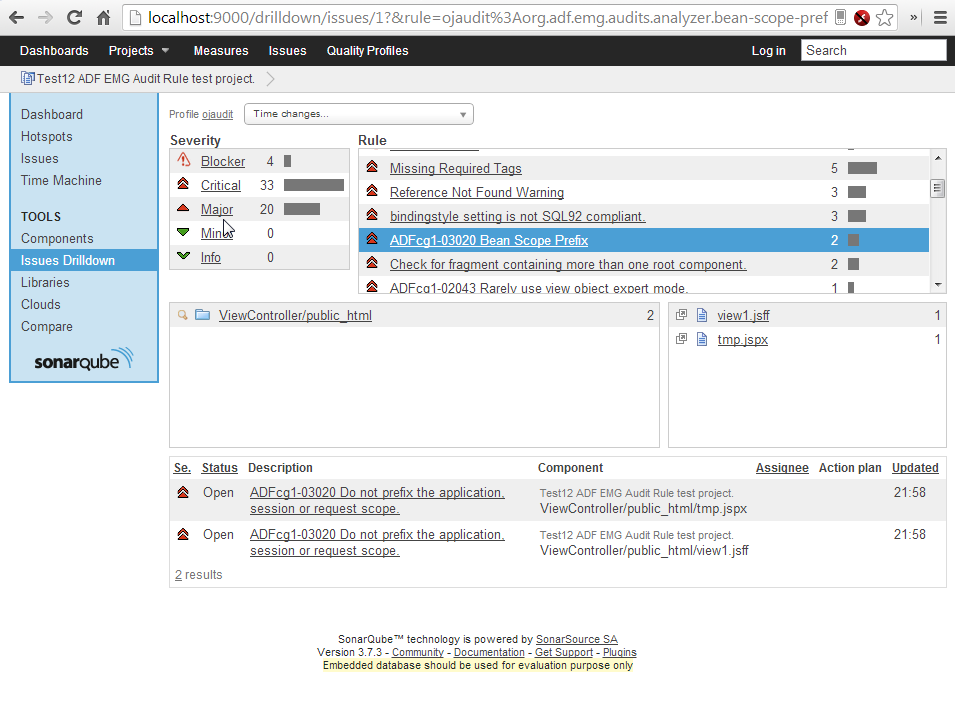
As we speak we’re still working on an SonarQube plug-in to automate this rules and make them visible in JDeveloper as well as SonarQube.
Resources:
- The ADF EMG Audit Rules project on java.net.
In two previous blogs I showed you how to create audit rules and how to create a fix for your audit rule using the JDeveloper Extension Framework. If you want to get your hands dirty writing some of your own rules, there now is a good starting point for that.

The idea was created during a few sessions with Wilfred van der Deijl creating our presentation, Quality Assurance with the JDeveloper Auditing Framework, for the UKOUG. The goal is to try and create an extension project, to automate ADF coding standards and best practises. The current idea is to use the ADF Code Guidelines document as starting point to create custom rules.

As time is always a critical matter in situations like this, all help is welcome. Anyone who wants to contribute and help us writing code/rules/fixes/etc is welcome to do so. I think it would be a create feature for the whole ADF community if we can write an extension that checks the most common pitfalls already during development.
As we speak we’re still working on an SonarQube plug-in to automate this rules and make them visible in JDeveloper as well as SonarQube.
Resources:
- The ADF EMG Audit Rules project on java.net.
- The ADF EMG on google.
- A thread on ADF EMG about this subject.
- The ADF Architecture Square
- The ADF Code Guidelines v1.00
- A thread on ADF EMG about this subject.
- The ADF Architecture Square
- The ADF Code Guidelines v1.00
Write a fix for your audit rule
In a previous blog I described how to build an audit rule in JDeveloper 12c, besides the audit rule, you can also write a fix for this rule. In this example, the fix isn’t anything fancy, but it gives you an idea on how to write more complex fixes. The rule we created in the previous blog was one to check if there was an iterator in a pagedefinition file that has the attribute cacheResults set to false.
The fix for this rule will be to set the value back to true.
First we open the Extension.xml, in the Extension.xml insert a transform definition inside the audit-hook:


The result in the extension file should like something like this:
                    JSF


                    nl.olrichs.audits.IterCacheTransform


                    sample-category
                    true
                    warning

                        transform-iter-cache


                     nl.olrichs.audits.IterCacheAnalyzer
In the
resource bundle, create a property for the label to display, take the
transform-definition id and add .label behind it. In this case:

Next we need to create the actual Java Transform class.

/**
     * Default no-arg constructor.
     * Calls the super with new XmlTransformAdapter.
     */
    public IterCacheTransform() {
        super(new XmlTransformAdapter());
    }

    /**
     * Set the attribute value (cacheResults) to true.
     */
    public void apply(XmlTransformContext xmlTransformContext, Attr attr) {
        attr.setValue("true");
    }
As we've seen for the audit rule with the enter and exit methods, you can write a fix (apply) for different levels (for example: Document, Element, Attr) as well. In this case we only need an fix on the Attr, so we only create an apply on this level.
Don’t forget to deploy to the Target Platform before running your extension. The result is not only a warning in the pageDef, it is also a suggestion for a fix with the label we defined in the bundle.

When you click the fix, you will see the value toggle from false to true.

For more information about creating Audit Rules, please check out my index page on topics around this subject.
Write your own Audit Rule Extension in JDeveloper 12C
JDeveloper comes with a nice audit framework, one of the great things about this framework is that you can write your own code to check for specific standards or fire specific rules you want to check. If you want to write extensions in 11g I recommend one off the two following posts:
For 11R1 check Arvinder Singh's blog.
For 11R2 check John ‘JB’ Brock's blog.
JDeveloper 12C is more like the 11R2 way, but still differs in some things. Especially the blog entry by John 'JB' Brock was very useful to me.
For more information about creating Audit Rules, please check out my index page on topics around this subject.
Now, before you start, don’t forget to get the Extension SDK in JDeveloper, this is very easy to download through Help -> Check for Updates -> Extension SDK. In this example I wrote a simple rule, that checks the pagedef file for iterators and wether the cacheResults property is set to false. If so, it throws a warning to point out that this setting might not be the way you want it.
Start a new Application and pick the Extension Application:

Give it a good name and except all the defaults in the other steps. By default JDeveloper creates a Res.properties file for you that is your resource bundle. Next to that it creates an extension.xml and a Manifest.mf.
The extensions.xml is much cleaner in 12C, the Manifest takes over some tasks from this extension file. The great thing is that you can use the overview from the Extension.xml where you configure your extension and that JDeveloper automaticly generates the Manifest file for you:

Next you need to configure your hook in the Extension.xml, this is where you define your Java class where the actual rule magic happens.

As said, the overview works pretty good to configure what you need in the extension.xml, but I will also give the xml snipped from the source:
In the triggers section, you define your audit-hook, fill in the category that it belongs to, I choose a sample-category. Set the properties on the rule-definition, make sure you give it a good ID, set the severity and put it in the correct category. Next you define your analyzer class, this is the Java Class you need to fire the rule.
Last but not least you need to define a project technology as trigger.
Next we can define some properties in the resource bundle that will be picked up automatically (notice that the resource bundle is coupled to your extension by the extension.xml):

So lets look at the actual Java class that is defined in the audit-hook. First off all, this class needs to extend the oracle.jdeveloper.audit.analyzer.Analyzer.
Next you need to inject the rule into the analyzer:
Now you can hook into different enter and/or exit methods. In this example I only need the enter method for the document and the exit on the attribute. The code is in the snipped below, see the JavaDoc section for functional explanation:
Now that the rule is set up, lets look at running and testing this rule. What I do first is deploy the extension to the current platform:

After this, you can deside to Run or Debug the extension by right clicking the project and select Run or Debug Extension. You will see that a new instance of JDeveloper gets started and you can test your extension in here.
In the newly started JDeveloper, you can make a final check in your preferences to see the rule. Here you can configure your Audit profile. Go to Tools -> Preferences -> Audit -> Profiles:

Here you should see the category that you filled into your resource bundle and under it the rule that your just created. Make sure the checkbox is enabled so it will run.
I created a fake pageDef with an iterator and the cacheResult property set to false. You see that the rule gets fired and the configured message from the resource bundle is shown. You also see the warning on the right top in the source editor:

For 11R1 check Arvinder Singh's blog.
For 11R2 check John ‘JB’ Brock's blog.
JDeveloper 12C is more like the 11R2 way, but still differs in some things. Especially the blog entry by John 'JB' Brock was very useful to me.
For more information about creating Audit Rules, please check out my index page on topics around this subject.
Now, before you start, don’t forget to get the Extension SDK in JDeveloper, this is very easy to download through Help -> Check for Updates -> Extension SDK. In this example I wrote a simple rule, that checks the pagedef file for iterators and wether the cacheResults property is set to false. If so, it throws a warning to point out that this setting might not be the way you want it.
Start a new Application and pick the Extension Application:

Give it a good name and except all the defaults in the other steps. By default JDeveloper creates a Res.properties file for you that is your resource bundle. Next to that it creates an extension.xml and a Manifest.mf.
The extensions.xml is much cleaner in 12C, the Manifest takes over some tasks from this extension file. The great thing is that you can use the overview from the Extension.xml where you configure your extension and that JDeveloper automaticly generates the Manifest file for you:

Next you need to configure your hook in the Extension.xml, this is where you define your Java class where the actual rule magic happens.

As said, the overview works pretty good to configure what you need in the extension.xml, but I will also give the xml snipped from the source:
                    sample-category
                    true
                    warning


                     nl.olrichs.abc.audits.inn.IterCacheAnalyzer


                    JSF
In the triggers section, you define your audit-hook, fill in the category that it belongs to, I choose a sample-category. Set the properties on the rule-definition, make sure you give it a good ID, set the severity and put it in the correct category. Next you define your analyzer class, this is the Java Class you need to fire the rule.
Last but not least you need to define a project technology as trigger.
Next we can define some properties in the resource bundle that will be picked up automatically (notice that the resource bundle is coupled to your extension by the extension.xml):

So lets look at the actual Java class that is defined in the audit-hook. First off all, this class needs to extend the oracle.jdeveloper.audit.analyzer.Analyzer.
Next you need to inject the rule into the analyzer:
    @ExtensionResource("nl.olrichs.abc.audits.rule-invalid-iter-cache")
    private Rule CACHE_RESULT_FALSE;
Now you can hook into different enter and/or exit methods. In this example I only need the enter method for the document and the exit on the attribute. The code is in the snipped below, see the JavaDoc section for functional explanation:
    /**
     * Enter a document.
     * Check to see if this is a pageDefinition file. If not, we can stop here.
     */
    public void enter(AuditContext context, Document document) {
        String firstNodeOfdocument = document.getDocumentElement().getNodeName();
        if (!"pageDefinition".equals(firstNodeOfdocument)) {
            setEnabled(false);
        }
    }

    /**
     * Enter an element, put the element on the context.
     */
    public void enter(AuditContext context, Element element) {
            context.setAttribute(elementKey, element);
    }

    /**
     * Exit an attribute, check if this element is inside an iterator.
     * If so, check if we're an cacheResult attribute and check the value.
     * Report the results back to the Editor.
     */
    public void exit(AuditContext context, Attr attr) {
        if ("iterator".equals(attr.getOwnerElement().getNodeName()) &&
            "CacheResults".equals(attr.getName()) &&
            "false".equalsIgnoreCase(attr.getValue())) {
            context.report(CACHE_RESULT_FALSE);
        }
    }
Now that the rule is set up, lets look at running and testing this rule. What I do first is deploy the extension to the current platform:

After this, you can deside to Run or Debug the extension by right clicking the project and select Run or Debug Extension. You will see that a new instance of JDeveloper gets started and you can test your extension in here.
In the newly started JDeveloper, you can make a final check in your preferences to see the rule. Here you can configure your Audit profile. Go to Tools -> Preferences -> Audit -> Profiles:

Here you should see the category that you filled into your resource bundle and under it the rule that your just created. Make sure the checkbox is enabled so it will run.
I created a fake pageDef with an iterator and the cacheResult property set to false. You see that the rule gets fired and the configured message from the resource bundle is shown. You also see the warning on the right top in the source editor:

Subscribe to:
Posts (Atom)