Since I am fairly new to the Oracle Service Bus I gathered a lot of information about this product. Most of it is not shocking and has been mentioned already, but this gave me a nice summarized overview of what 12c has to offer in comparing to 11g.
JDeveloper
Since the 12.1.3 release, you don’t need eclipse anymore to create your service bus projects. Just as for the SOA Suite you can do everything from JDeveloper. When creating a service bus project, you will get an sboverview file in your project. This file describes the entire application assembly of proxy services, business services, pipelines, and split-joins. There is one overview file for each Service Bus project.
Debugger
Not only are the Service Bus projects within JDeveloper, they also run on the Integrated WebLogic server. This way it becomes easier to debug the service bus. You can just place breakpoints in your source files and choose the debug command. A breakpoint marks a point in a pipeline or split-join where message processing pauses. This lets you examine the values of some or all of the message variables.
EM FMW Control Console
With the move of the service bus towards JDeveloper, it is now also integrated into the Enterprise Manager Fusion Middleware Control Console as we know it from the SOA Suite. However, there still is the sbconsole as we know it. The layout of the sbconsole has been moved towards the Oracle standard, with that the functionality as you know it from 11g might be displayed a bit different but it is all still there.
Rest/json support
The Service Bus now supports the use of REST service. Meaning you can create rest enabled endpoint with the service bus. However, the Service Bus only provides a virtualization layer to support REST, which means that only proxy and business services are REST-based. These REST services invoke, or are invoked by, a WSDL-based pipeline or split-join. REST proxy services convert the REST native payload to SOAP before invoking a pipeline or split-join, while REST business services invoked by a pipeline or split-join convert the payload from SOAP to REST. The internal interface is WSDL-based, while the external business and proxy services expose REST endpoints.
Read more in the Service Bus documentation.
Pipeline templates
You can create pipeline templates. These templates are living entities, when creating a new pipeline you can base these on the template. When creating these new pipeline you can decide whether you want it to be linked or unlinked.
If you decide to link the template to your pipeline this means that when the template changes, these changes will be rolled out to the linked pipelines and these will be updated. If you decide to unlink a template, the template will be used as a starting point to create the pipeline, but it will not be updated anymore if the template changes.
Xpath/xquery support
Where you might be used to xpath in the SOA Suite and xquery in the Service bus. With the release of 12.1.3 you can now use both xpath and xquery in the Service Bus as well as the SOA Suite.
Tracing
You can now trace an instance going through both the service bus and the soa suite back and forth. The first service that your instance hits will generate an ecid, this ecid will be used throughout the whole instance. This also works if your SOA Suite and Service bus run on a different domain.
Splitted Pipeline & Proxy Service
You can have a generic pipeline to multiple proxies, this way you can have multiple interfaces, for example to support both an xml and a json interface, but use the same generic pipeline.
Upcoming New Feature
There were a few demos of new features coming in the next release (12.2).
From 12.2 there will be a native end to end support for json, meaning the service bus will no longer translate the json to xml internally. Next to that, there will be a JavaScript action available which you can use in the pipeline to manipulate data. With the help of EX4 this JavaScript expression builder will also be available to manipulate xml, meaning that JavaScript will be a powerful tool within the Service Bus.
Available online resources

What I learned at Oracle Open World 2014
Oracle Open World was once again very inspiring, last week I’ve been summarizing my own notes. I decided to share them with the world, if not only for me to find them back in my own blog archive in the (near) future.
As you might have guessed, there was a lot going on about the cloud. So much, it was almost confusing. The most interesting clouds that stayed with me after OOW14 where:
However, since I am not really working with any cloud related product, my main focus was on the on-premise Oracle FMW stack. So if you want to know more about the cloud, there are plenty of other, better blogs to tell you more about these details.
SOA Suite Upgrade to 12c
First of all, very impressive, you can smoothly upgrade from 11g to 12c. There is an extensive upgrade manual that you can follow, to upgrade from your 11g to the new 12.1.3. release. If you follow the step by step guide, the upgrade will even work if you have running instances on your production environment.
This upgrade has been proven to work on multiple customer cases.
API Management
Oracle will be announcing two new product which will help you with your API management, this features will be on top of the Oracle Service Bus. There are two sides of this product, which are actually separated products. One is to help out with your catalog of services, which are you running on the service bus. This information can be harvested from the bus and will be available in a catalog.
The second product is to help you with managing the consumers of your services. Your consumers must explicitly subscribe to your service in order to get an API key. They must use this API key in the http header when they call the service in order to get a result. Using this feature you get a complete overview of the consumers calling your service.
Oracle Stream Explorer
Oracle Stream Explorer (OSX) is a tool that can help you with getting information out of Oracle Event Processing (OEP). OSX can help you transforming lots of data into information. Stream Explorer can not only listen to edn, but also get input from csv files, database tables and other sources. It is a standalone product that helps you manipulate streams of data (events). Once the data is transformed into information, Stream Explorer can publish this again, for example to a JMS queue.
You can build a custom ADF UI to present this information or you can use Oracle Business Activity Monitoring (BAM).
Mobile Application Framework
The Oracle Mobile Application Framework (MAF) 2.0 is out and it starts to become a really mature product, one of the key things is the new release cycle for MAF. They intend to release every 2 months from now on.
One of the most named down sides of MAF is that it still runs on Java 4. However, not in the upcoming, but the release after that (meaning early next year), MAF will be upgraded to use Java 8. If you ever doubted on starting to investigate on MAF, now might be a good time.
The skills for a ADF developer are pretty transferable, MAF does not use JSF and does not have the ADF lifecycle as we know it from his big brother, but we do have java, taskflows, data controls and the binding layer.
Mobile Cloud Service
In the session ‘Next-Generation Application Development’, Chris Tonas said “The cloud is not just a deployment platform anymore”. Chris announced the coming of the Mobile Cloud Service (MCS), which is coming soon.
In a fifteen minute demonstration Chris showed how you can create an online mobile application, using the Mobile Application Accelerator (MAX) for Mobile Cloud Service. An application based on reusable MAF components you can deploy to either Android or iOS devices.
Service Bus & ADF
For both Service Bus & ADF I gathered so much info that I decided to create two separated blogs for these subject.
Online available resources
As you might have guessed, there was a lot going on about the cloud. So much, it was almost confusing. The most interesting clouds that stayed with me after OOW14 where:
- The Integration Cloud Service (ICS).
- The Java Cloud Services (JCS) in combination with the Developer Cloud Service (DCS).
- Mobile Cloud Service (MAX).
However, since I am not really working with any cloud related product, my main focus was on the on-premise Oracle FMW stack. So if you want to know more about the cloud, there are plenty of other, better blogs to tell you more about these details.
SOA Suite Upgrade to 12c
First of all, very impressive, you can smoothly upgrade from 11g to 12c. There is an extensive upgrade manual that you can follow, to upgrade from your 11g to the new 12.1.3. release. If you follow the step by step guide, the upgrade will even work if you have running instances on your production environment.
This upgrade has been proven to work on multiple customer cases.
API Management
Oracle will be announcing two new product which will help you with your API management, this features will be on top of the Oracle Service Bus. There are two sides of this product, which are actually separated products. One is to help out with your catalog of services, which are you running on the service bus. This information can be harvested from the bus and will be available in a catalog.
The second product is to help you with managing the consumers of your services. Your consumers must explicitly subscribe to your service in order to get an API key. They must use this API key in the http header when they call the service in order to get a result. Using this feature you get a complete overview of the consumers calling your service.
Oracle Stream Explorer
Oracle Stream Explorer (OSX) is a tool that can help you with getting information out of Oracle Event Processing (OEP). OSX can help you transforming lots of data into information. Stream Explorer can not only listen to edn, but also get input from csv files, database tables and other sources. It is a standalone product that helps you manipulate streams of data (events). Once the data is transformed into information, Stream Explorer can publish this again, for example to a JMS queue.
You can build a custom ADF UI to present this information or you can use Oracle Business Activity Monitoring (BAM).
Mobile Application Framework
The Oracle Mobile Application Framework (MAF) 2.0 is out and it starts to become a really mature product, one of the key things is the new release cycle for MAF. They intend to release every 2 months from now on.
One of the most named down sides of MAF is that it still runs on Java 4. However, not in the upcoming, but the release after that (meaning early next year), MAF will be upgraded to use Java 8. If you ever doubted on starting to investigate on MAF, now might be a good time.
The skills for a ADF developer are pretty transferable, MAF does not use JSF and does not have the ADF lifecycle as we know it from his big brother, but we do have java, taskflows, data controls and the binding layer.
Mobile Cloud Service
In the session ‘Next-Generation Application Development’, Chris Tonas said “The cloud is not just a deployment platform anymore”. Chris announced the coming of the Mobile Cloud Service (MCS), which is coming soon.
In a fifteen minute demonstration Chris showed how you can create an online mobile application, using the Mobile Application Accelerator (MAX) for Mobile Cloud Service. An application based on reusable MAF components you can deploy to either Android or iOS devices.
Service Bus & ADF
For both Service Bus & ADF I gathered so much info that I decided to create two separated blogs for these subject.
Online available resources
- SOA Suite Upgrade Guide
- Mobile Application Framework
- Event Processing
- Oracle Cloud
- Mobile Cloud Service
ADF EMG XML Data Control version 1.0.0
Today at Oracle Open World, we (Wilfred and myself) officially announced the 1.0.0 version of the ADF EMG XML Data Control. Check out the presentation on slideshare if you missed it.
You can get this extension through the JDeveloper Help -> Check for Updates menu. Make sure you select the 'Open Source and Partner Extensions' checkbox:

There you should see the 'ADF EMG Data Control' extension:

A brief description for those who were not at our OOW Sunday Session:
The XML Data Control is an ADF Data Control that is used by developers to create data bindings in ADF Faces pages, just like the ADF BC Data Control and the POJO Data Control. The data exposed through this data control can be any XML source – from a BPM Human Task, from a SOAP or REST WebService, from a static XML document or a custom Java Class that produces an XML document from anywhere.
Read more on this project on our public wiki.
If you’re interested in following or contributing to this open source project, make sure you bookmark the following links:
The ADF EMG XML Data Control Extension is available for both JDeveloper 11gR1 and JDeverloper 12c.
You can get this extension through the JDeveloper Help -> Check for Updates menu. Make sure you select the 'Open Source and Partner Extensions' checkbox:
There you should see the 'ADF EMG Data Control' extension:
A brief description for those who were not at our OOW Sunday Session:
The XML Data Control is an ADF Data Control that is used by developers to create data bindings in ADF Faces pages, just like the ADF BC Data Control and the POJO Data Control. The data exposed through this data control can be any XML source – from a BPM Human Task, from a SOAP or REST WebService, from a static XML document or a custom Java Class that produces an XML document from anywhere.
Read more on this project on our public wiki.
If you’re interested in following or contributing to this open source project, make sure you bookmark the following links:
The ADF EMG XML Data Control Extension is available for both JDeveloper 11gR1 and JDeverloper 12c.
ADF EMG Audit Rules moved to Atlassian
For those contributing and using the ADF EMG Audit Rules extension, this is now moved to the Atlassian Suite. Here we have better integration and more modern tools than on java.net.
Big thanks to Wilfred for helping me out with the conversion.
Make sure to save/bookmark the following links:
- Bitbucket
- Confluence / wiki
- Jira
- Bamboo
The old svn repository on java.net is deleted and you can now use git to connect to the repository on bitbucket. If you’re new to git I advise SourceTree from Atlassian as tool.
Big thanks to Wilfred for helping me out with the conversion.
Make sure to save/bookmark the following links:
- Bitbucket
- Confluence / wiki
- Jira
- Bamboo
The old svn repository on java.net is deleted and you can now use git to connect to the repository on bitbucket. If you’re new to git I advise SourceTree from Atlassian as tool.
ADF EMG Audit Rules available on JDeveloper 12.1.3
I got a few questions from people why the ADF EMG Audit Rules are not available in JDeveloper 12.1.3. So there has been a new release of the ADF EMG Audit Rules. No new functionality is implemented this time, but the extension is now available for JDeveloper 12.1.3.
If you go to Help -> Check for Updates, tick the Open source and Partner Extensions checkbox and press Next:
If you go to Help -> Check for Updates, tick the Open source and Partner Extensions checkbox and press Next:

Select the ADF EMG Audit Rules and click Next:

The extension ADF EMG Audit Rules should be installed correctly, click finish and restart JDeveloper 12.1.3:

Now if you go to your Tools -> Preferences, there is a button ‘Manage Profles’ on top of the Audit tab, you will find your profiles under that submenu. Press the button to open the Profiles menu:

Within the Audit Profile, you should see the ADF EMG Audit Rules appear:

Presentations at Oracle Open World 2014
I am proud to announce that I will be giving two presentation at Oracle Open World this year in San Francisco. So some shameless self-plug on my blog to put them both under a little extra attention.
The first one will be on the ODTUG's and ADF EMG ADF Sunday, together with Wilfred. We will explain and demonstrate our new open source project/product the ADF EMG XML DataControl.
If you’re working with Oracle ADF and WebServices, this one should be very interesting for you.

The second one is on Tuesday, together with Frank Houweling from AMIS and Frédéric Desbiens from Oracle. We will be talking about build environments, performance within ADF and quality assurance. I am confident I will be able to mention my other open source initiative the ADF EMG Audit Rules.

Hope to see you there!
The first one will be on the ODTUG's and ADF EMG ADF Sunday, together with Wilfred. We will explain and demonstrate our new open source project/product the ADF EMG XML DataControl.
If you’re working with Oracle ADF and WebServices, this one should be very interesting for you.
The second one is on Tuesday, together with Frank Houweling from AMIS and Frédéric Desbiens from Oracle. We will be talking about build environments, performance within ADF and quality assurance. I am confident I will be able to mention my other open source initiative the ADF EMG Audit Rules.
Hope to see you there!
Use tree binding accessors to show detail rows
Tree bindings can be very handy, for example to combine details in the same row as the master. Let’s assume we have the following starting point based on the HR schema:

We see the department in a form layout with navigation buttons, with a table under the form showing information about the employees. As you can see in the screenshot below in the ApplicationModule, there is also a Jobs detail under the EmployeeView.

If you go to the bindings on the page, you see the Tree Binding ‘EmployeesView’. You can edit the Tree binding very easily through the overview of the binding page. If we add the JobsView as detail this will be available in the page as well.

Don’t forget to shuffle the attributes that you need to the right:
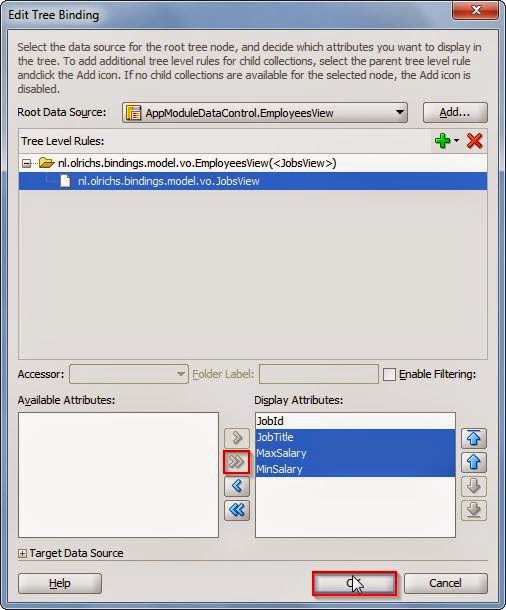
After pressing ok, the source of the PageDef should now look something like this:

You see that the first nodeDefinition in the tree has gained an Accessors element, in this Accessors element there is an item with the name JobsView. We can now use this accessor in our table in the page as well. To illustrate I add two new columns to the table.

The editor does not really understand this, so you do not get any help from the IDE. You can see that the EL expression to the hints of the EmployeeView is the same, but after that we use the accessor value to navigate to that nodeDefinition in the Tree, after which we enter the value from the AttrName inside this nodeDefinition.
The value itself however, we need to access through the row. You can see the EL expression in the value of the outputText. After the row we again first use the accessor value but then go to the bindings, after the bindings we enter the AttrName value and we end the EL expression with the inputValue.
On run time this results in the two extra added columns:

Subscribe to:
Posts (Atom)